If you want different fonts to write in, think in four groups: serif for long reading, sans-serif for clean screens, monospace for drafting, and readability-focused fonts for anyone who finds standard text tiring. This guide covers each group with named examples, then shows where to change or add fonts in Google Docs, Word, and note apps. It is aimed at everyday writing such as essays, notes, emails, and drafts. If you want expressive fonts for posters and journals instead, use a decorative font only for headings and keep a plain one for the text itself.
The four main groups of writing fonts
| Group | What it looks like | Examples | Best for |
|---|---|---|---|
| Serif | Small strokes (serifs) at letter ends | Times New Roman, Georgia, Garamond, Lora, Merriweather | Essays, books, printed pages |
| Sans-serif | Plain strokes with no serifs | Calibri, Arial, Open Sans, Inter, Lato | Screens, emails, notes, slides |
| Monospace | Every letter has the same width | Courier New, Consolas, Courier Prime, DM Mono | Drafting, scripts, code and plain text |
| Readability-focused | Clear shapes that avoid look-alike letters | Atkinson Hyperlegible, Andika | Low vision, learning to read, tired eyes |
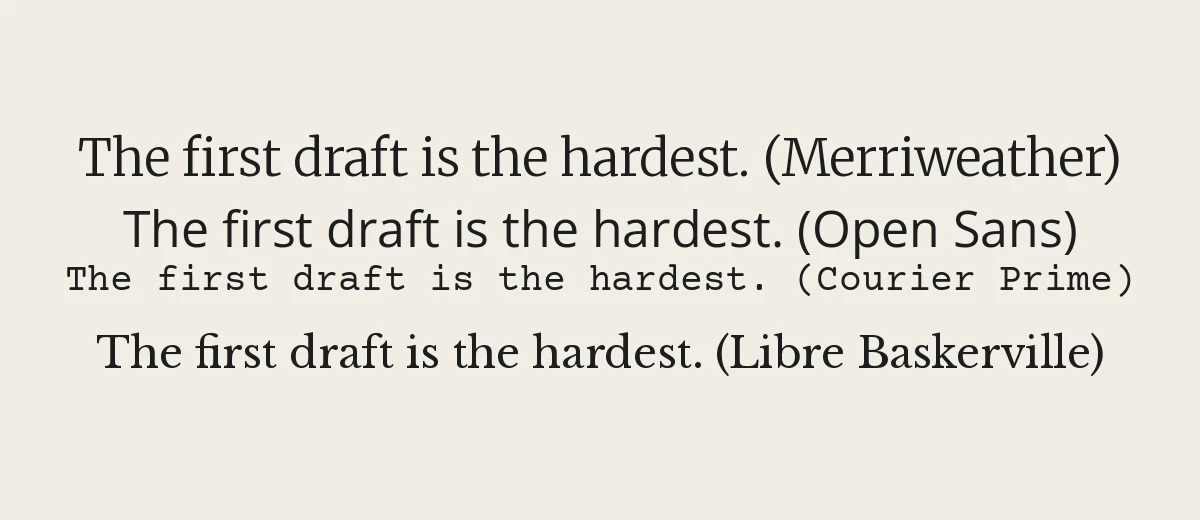
Serif fonts for long reading
Serif fonts have traditionally been used for books and printed documents. The small strokes at the end of each letter help guide the eye along a line. In Word and other office programs you will find Times New Roman and Georgia. Georgia was drawn for screens and is a comfortable choice for reading on a monitor. In the Google Fonts library, Lora, Merriweather, Libre Baskerville, and Crimson Text are good options for essays and stories, and they are free to use under open licenses. If you want to understand the style, read what is a serif font, or browse serif fonts.
Sans-serif fonts for screens and everyday notes
Sans-serif fonts have plain letter endings and a cleaner look. Arial and Calibri have long been standard in office software, and newer Microsoft 365 versions may default to a newer font, so your own default can differ. Among Google Fonts, Open Sans, Lato, Inter, and Source Sans 3 are neutral choices that work well for emails, notes, and slides. A sans-serif typically looks tidier at small sizes on a screen. For more ideas, see minimalist fonts.
Monospace fonts for drafting
In a monospaced font, every character takes the same horizontal space. That gives text an even, typewriter-like rhythm. Many writers like it for first drafts because it feels informal and keeps attention on words instead of looks. Courier Prime is a free font that follows the traditional screenplay look, so it is a sensible pick if you write scripts. DM Mono and Courier New are other options. Our monospace fonts page has more.
Fonts built for readability
Atkinson Hyperlegible was created by the Braille Institute to make characters easier to tell apart for readers with low vision. Andika was designed by SIL for literacy. Both are available free on Google Fonts. If you find standard fonts tiring, try one of these and increase line spacing to 1.5. Some people also prefer fonts specifically designed for dyslexia, and opinions about their benefit differ, so test one yourself and use what feels easier.
Where to find and change fonts in your apps
Google Docs and Slides
- Click the font name in the toolbar.
- Choose More fonts.
- Search by name or filter by style, then select the fonts you want to add.
Docs uses Google Fonts plus its own selection. It is the quickest way to try many styles.
Microsoft Word
Select the text and pick a font in the Home tab’s font box. To change the default for new documents, open the Font dialog box, choose a font, and select Set As Default. Fonts you download must be installed in your operating system first, and some Microsoft 365 versions also offer cloud fonts that download on demand. For Outlook, see how to change the default font in Outlook.
Notes apps
- Apple Notes: you can pick styles such as Title, Heading, Body, and Monostyled, but not any font you like.
- Notion: pages can be switched between its default, serif, and mono styles.
- Plain-text and Markdown apps: many let you choose any font installed on your computer from their settings.
On your phone
iPhone and Android do not usually let you change the system font in a simple way. Our guide on how to change font on iPhone covers what is and is not possible there.
Why trying different fonts helps your writing
Changing the font is a cheap editing trick. A draft written in a plain sans-serif feels different when you read it in a serif at a larger size, and awkward phrases that slipped by tend to stand out. Some writers draft in monospace to resist polishing as they go, then paste into a serif for a final read-through. Others change the font only for printing, because paper reading is a different experience from screen reading. None of this requires design knowledge; it only requires that you pick a font you can read comfortably for an hour.
Keep two things in mind. Fonts also change page count, so check length requirements after switching. And when you send a file to someone else, they may not have the same fonts, so export to PDF or use fonts available on any computer.
Where to get new fonts
- Google Fonts: a large library of free open-source families, each page showing its license.
- Your operating system: Windows and macOS include dozens of fonts that already appear in your apps.
- Font sites: our font library lists many families; always check the license before using a font in client or commercial work.
Read the license on each download page. Free to download does not always mean free for commercial use. Google Fonts families are released under open licenses such as the SIL Open Font License, which allow commercial use. See the Google Fonts about page for details.
How to choose for the job
| Task | Suggested font | Size and spacing |
|---|---|---|
| School essay | Times New Roman or Georgia | 12 pt, double spacing unless told otherwise |
| Arial, Calibri, or your app default | 11 pt | |
| Novel draft | Courier Prime or a readable serif | 12 pt, 1.5 spacing |
| Daily notes | Open Sans or Inter | 11 to 12 pt |
| Resume | A plain serif or sans-serif | 10 to 12 pt; see our resume font guide |
Tips for switching fonts without losing readability
- Use one font for all body text and at most one more for headings.
- Switch fonts to review your work. Reading the same text in a different font often reveals typos and awkward sentences.
- Save document layouts with the fonts you rely on. If you send a file to someone else, export to PDF so fonts do not change.
- Keep line length reasonable: roughly 50 to 75 characters per line is comfortable to read.
Frequently asked questions
What are good different fonts to write in for a document?
For essays and reports, use a serif such as Times New Roman, Georgia, or Lora, or a clean sans-serif such as Calibri, Arial, or Open Sans. Keep the size between 11 and 12 pt and follow any style guide you have been given.
Can I change the font in the iPhone Notes app?
Not to an arbitrary font. Notes offers a fixed set of styles such as Title, Heading, Body, and Monostyled. A different system-wide font is not available in standard iOS settings, though you can change text size.
How do I get more fonts in Google Docs?
Click the font name in the toolbar, choose More fonts, search for the font, and select it. It is then added to your font list and can be used in any of your documents.
What is the best font to write a novel or long text in?
A readable serif or a clean sans-serif at 11 to 12 pt. Many writers use a monospaced font like Courier Prime for drafting because it makes word count and page count easy to estimate, then switch for the final copy.
Do I need to install fonts to use them in Word?
For fonts that are not already part of Word, yes, install them on your computer first. Some newer versions of Microsoft 365 also offer cloud fonts that download on demand. Check your version’s font list.