Variable fonts what are they and how to use them: a variable font is a single font file that contains a whole range of styles, so instead of separate files for Light, Regular, and Bold, you slide along an axis and pick any weight in between. If you searched “variable fonts what is it”, that is the short answer. This guide explains the axes, the file-size trade-off, the CSS to use them, which design apps support them, and how to install one on your computer.
Variable fonts: what is it, exactly?
A traditional font family is a set of separate files, one per style: Regular, Italic, Bold, Bold Italic, and so on. A variable font stores the extremes of the design and calculates everything in between. The format is called OpenType Font Variations, and it was introduced in 2016 as part of OpenType 1.8 through a joint effort from Apple, Google, Microsoft, and Adobe.
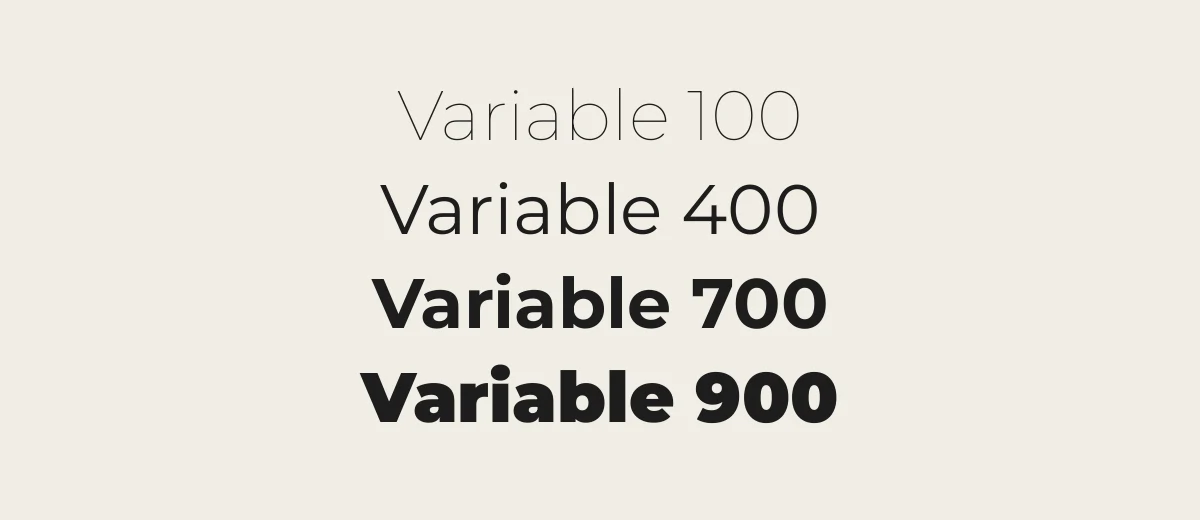
The idea is the same as sliding a dial. At one end is a Thin weight, at the other a Black weight, and the font can draw any weight in between, such as 450 or 650. Each dial is called an axis.
The axes you will meet
Five axes are registered in the OpenType specification and have standard names. Fonts can also define their own custom axes, which use four capital letters.
| Tag | Name | What it changes |
|---|---|---|
| wght | Weight | Stroke thickness, from light to heavy |
| wdth | Width | How wide or condensed the letters are |
| slnt | Slant | Angle of an oblique style, in degrees |
| ital | Italic | A switch between upright (0) and italic (1) forms |
| opsz | Optical size | Adjusts details for small text or large display sizes |
Real Google Fonts families show how different the axes can be, based on their Google Fonts metadata:
- Inter has weight (100 to 900) and optical size.
- Playfair Display has weight only (400 to 900), with a separate file for italics.
- Playfair (the 2023 successor) has weight, width, and optical size.
- Cairo, an Arabic and Latin family, has weight (200 to 1000) and slant.
- Roboto Flex has 13 axes, including weight, width, optical size, slant, and grade.
- Fraunces and Recursive include custom axes such as “SOFT”, “WONK”, “CASL”, and “MONO” that change the personality of the letters.
Not every variable font has every axis, so check the font page before you plan a design around one.
File size: does one file save space?
It depends. A variable font file is larger than one static file, because it carries more data. It is usually smaller than loading several static weights of the same family, though, and it is one request instead of many. On a website that uses four or five weights, a variable font often wins. If you only need Regular and Bold, two static files may be smaller. Test both with your own pages instead of assuming.
Variable fonts also let you use weights you would not normally ship, such as 550 for a slightly bolder body text, without adding another file.
How to use variable fonts in CSS
All current major browsers support variable fonts. The easiest route is Google Fonts, which serves them through its CSS API. To request a weight range, use a range in the URL:
<link href="https://fonts.googleapis.com/css2?family=Inter:wght@100..900&display=swap" rel="stylesheet">When you ask for more than one axis, list them in alphabetical order with lowercase axis tags before uppercase ones. For example, Roboto Flex with optical size, width, and weight looks like family=Roboto+Flex:opsz,wdth,wght@8..144,25..151,100..1000.
If you host the font yourself, declare the range in @font-face so the browser knows it can interpolate:
@font-face {
  font-family: "Inter";
  src: url("/fonts/Inter-Variable.woff2") format("woff2");
  font-weight: 100 900;
  font-display: swap;
}
Then use the normal properties, which map to the standard axes:
font-weight: 650;sets the weight axis (any number in the font’s range).font-stretch: 85%;sets the width axis, if the font has one.font-style: oblique 10deg;sets the slant, andfont-style: italic;uses the italic axis or file.font-optical-sizing: auto;lets the browser set the optical size axis to match the font size. This is the default.
For custom axes, use font-variation-settings:
.title { font-variation-settings: "wght" 700, "SOFT" 100; }Use the standard properties wherever you can. Setting font-variation-settings in one rule replaces the whole list, so any axis you leave out in a later rule goes back to its default. CSS custom properties are a neat way to keep each axis value separate. The MDN variable fonts guide covers all of this in more detail.
Support in design apps
This is where variable fonts get uneven. Here is where things stand, with sources noted below.
| App | Variable font support |
|---|---|
| Photoshop | Yes. Variable fonts show a VAR icon in the font menu, and the Properties panel offers sliders for axes such as weight, width, slant, and optical size. Use a recent version. |
| Illustrator and InDesign | Yes, in current versions. Support arrived in Illustrator before InDesign. |
| Microsoft Word | No axis sliders. Google Fonts Knowledge groups Word with apps that show variable fonts only as a set of named static styles. Test before you share a document. |
| Apple Pages and Google Docs | No axis control. |
| Canva | No. Canva’s help page states that it does not support variable fonts. |
The Photoshop details come from Adobe’s own tutorial, the app grouping follows Google Fonts Knowledge and V-Fonts, and the Canva statement is from Canva’s Brand Kit fonts page. For other apps, the community site V-Fonts keeps a support table, which is worth checking because versions change quickly.
The practical workaround for any app without support is to use static files. Google Fonts downloads usually include a folder of static weights next to the variable files, and many static versions are generated from the same design. If you work in Canva, our guide on uploading a font to Canva explains the format rules.
Installing a variable font on your computer
- Download the font and unzip the file. Variable files are usually named with the axes in brackets, such as
Inter[opsz,wght].ttf. - Windows: right-click the file and choose Install, or install it from Settings, Personalization, Fonts. Windows 10 (since the 1709 update) and Windows 11 support variable fonts.
- macOS: double-click the file and choose Install Font in Font Book. Variable fonts are supported from macOS 10.13 High Sierra.
- Restart your design app. In apps that support variable fonts, you will see sliders. In others, you will see named instances such as Regular and Bold, or just one default style.
Avoid installing both the variable and the static versions of the same family. They can appear as duplicates and cause the wrong one to be used in older apps. Choose static files for Word and Canva, and variable files for Photoshop and the web.
Free variable fonts to try
All of these are on Google Fonts under the SIL Open Font License, so you can use them commercially.
| Font | Axes | Good for |
|---|---|---|
| Inter | wght, opsz | Interfaces, body text |
| Roboto Flex | 13 axes, including wght, wdth, opsz, slnt | Experimenting with every axis |
| Playfair Display | wght | Elegant headlines |
| Fraunces | wght, opsz, SOFT, WONK | Warm, characterful serif headings |
| Recursive | wght, slnt, CASL, CRSV, MONO | Code, UI, playful text |
| Montserrat | wght | Headlines and logos |
| Anybody | wght, wdth | Posters with big width changes |
For a deeper read, see Introducing variable fonts on Google Fonts Knowledge, and use the filters on the main Google Fonts list to narrow down to variable families. For Google’s own picks, see what font Google uses. Find static choices on our headline fonts page and explore all of our font collections.
When a variable font is not the right choice
- You only need one or two weights of a family on a site.
- Your design tool does not support variable fonts, as with Canva.
- You send documents to people who may open them in Word or Pages without the font installed, where the result depends on their system.
- Your brand font is licensed as static files only. Check the license, since the variable version may be a separate product.
Frequently asked questions
What is a variable font?
A variable font is one font file that contains a range of styles along one or more axes, such as weight or width. You can choose any value on the axis, not just fixed styles like Regular or Bold.
Are variable fonts better than regular fonts?
Not always. They are flexible, and often smaller than loading many static weights on a website. But some apps, including Canva and Word, do not give you axis controls, and static files can be smaller if you need only one or two weights.
Do variable fonts work in Canva or Word?
Canva’s help page says it does not support variable fonts, so use static files. Word does not offer axis sliders, though some named styles may appear. Photoshop, Illustrator, and InDesign support variable fonts in current versions.
What is the difference between font-weight and font-variation-settings?
font-weight sets the standard weight axis and works with any value in the font’s range. font-variation-settings can set any axis, including custom ones, but it replaces the whole list in a rule, so use the standard properties where you can.
Where can I find free variable fonts?
Google Fonts has many, including Inter, Roboto Flex, Playfair Display, Fraunces, Recursive, and Montserrat. All are under the SIL Open Font License. Check each font page to see which axes it has.