To find fonts for your bio, write the bio in plain text first, then decide how much of it needs a style, and pick a Unicode text style that stays readable on Instagram, TikTok and X. Those platforms do not offer a font menu for bios, so “finding a font” really means choosing a styled-text look and pasting it in. This is a step-by-step process that takes about ten minutes and avoids the usual mistakes.
Step 1: know what a bio font really is
A bio font is not a font setting. Generators swap your letters for look-alike characters from Unicode, such as 𝐛𝐨𝐥𝐝, 𝑖𝑡𝑎𝑙𝑖𝑐 or 𝓼𝓬𝓻𝓲𝓹𝓽 versions. Your bio then displays those characters in whatever font the viewer’s phone uses. That means no download, and it works across apps, but it also means the look varies a little between devices. For the full explanation, see our guide to font generators.
Step 2: check your platform’s limits
Each app has a different space, and styled letters are often wider on screen. These limits are widely reported, but platforms change them, so check the counter in the app.
| Platform | Bio length (commonly reported) | Good to know |
|---|---|---|
| 150 characters | Username: letters, numbers, periods, underscores. Name field is separate and searchable. | |
| TikTok | 80 characters | Short, so one styled word goes a long way. The link field is separate. |
| X (Twitter) | 160 characters | Handle and display name are separate; links and mentions in a bio are clickable. |
The Instagram Help Center is the best place to check current Instagram rules. If you are curious about the typeface the app itself uses, see what font X uses and what font Instagram uses.
Step 3: write the plain-text bio first
Style can’t rescue a vague bio. Draft it in your notes app and cover three things:
- Who you are or what you offer, in a few words.
- One proof or personality detail, such as a city, a specialty or a hobby.
- What to do next, such as “New posts Fridays” or “Orders via DM”.
Example, 56 characters: “Illustrator in Leeds. Cats, tea and zines. Prints below.” It fits every platform above. Only after it reads well should you think about a style.
Step 4: decide what to style
The most common mistake is styling everything. A better rule is to style at most one element:
- Your name or job title in the first line, or
- One tagline, or
- A single call to action.
Leave searchable words, such as your profession, in plain text. If someone searches for “illustrator”, a styled version will not match it.
Step 5: choose a style that fits your account
Match the style to the voice of your profile. Here is how the same words look:
| Account type | Style | Example |
|---|---|---|
| Professional, creator, business | Sans bold | 𝗜𝗹𝗹𝘂𝘀𝘁𝗿𝗮𝘁𝗼𝗿 𝗶𝗻 𝗟𝗲𝗲𝗱𝘀 |
| Personal, lifestyle, wedding | Bold script | 𝓘𝓵𝓵𝓾𝓼𝓽𝓻𝓪𝓽𝓸𝓻 𝓲𝓷 𝓛𝓮𝓮𝓭𝓼 |
| Writer, photographer | Monospace | 𝙸𝚕𝚕𝚞𝚜𝚝𝚛𝚊𝚝𝚘𝚛 𝚒𝚗 𝙻𝚎𝚎𝚍𝚜 |
| Gaming, music, gothic | Bold Fraktur | 𝕴𝖑𝖑𝖚𝖘𝖙𝖗𝖆𝖙𝖔𝖗 𝖎𝖓 𝕷𝖊𝖊𝖉𝖘 |
| Minimal, tidy | Small caps | ɪʟʟᴜsᴛʀᴀᴛᴏʀ ɪɴ ʟᴇᴇᴅs |
| Cute, playful | Circled | Ⓘⓛⓛⓤⓢⓣⓡⓐⓣⓞⓡ ⓘⓝ Ⓛⓔⓔⓓⓢ |
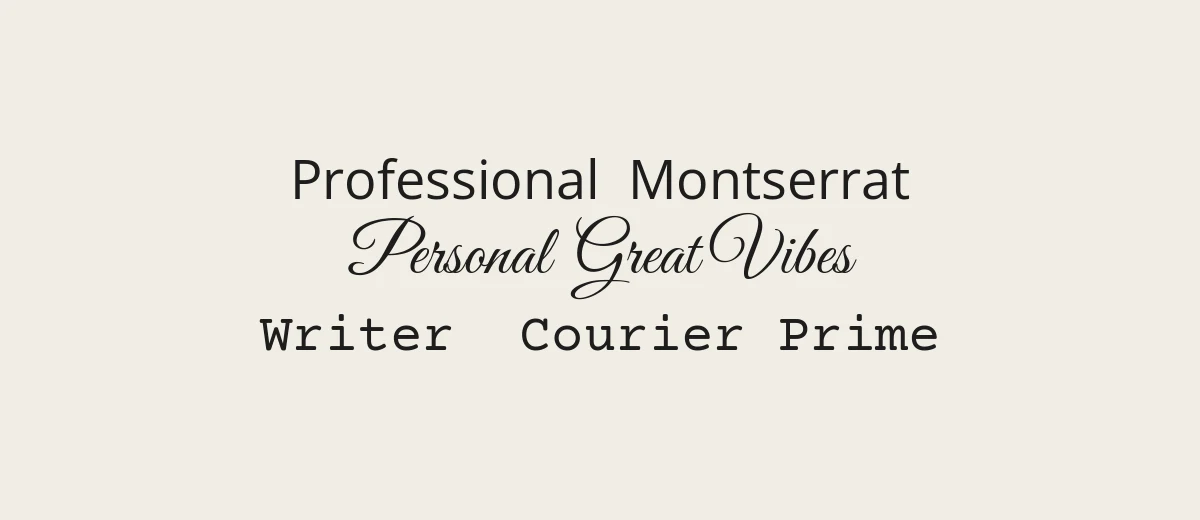
Browse more in fancy font copy and paste, cute font copy and paste and gothic font copy and paste. If unsure, bold or sans bold is the most reliable across devices.
Three finished examples
- Small business: 𝗟𝗲𝗲𝗱𝘀 𝗖𝗮𝗻𝗱𝗹𝗲 𝗖𝗼. Hand-poured soy candles. Ships UK-wide. Order below.
- Personal: 𝓜𝓪𝔂𝓪 Reader, runner, tea drinker. Based in Austin.
- Gaming: 𝕹𝖎𝖌𝖍𝖙𝕺𝖜𝖑 Streams Tue and Thu. Join the Discord.
In each one, only the name is styled. The rest is plain text that search, screen readers and every phone handle without a problem.
Step 6: generate and copy
- Open a copy and paste font generator in your browser.
- Type or paste only the words you want styled.
- Scroll through the results and copy the one you chose in step 5.
- Paste it into your notes next to the plain text to check the spacing.
Step 7: paste it into your bio
- Instagram: go to your profile, tap Edit profile, then Bio, paste and save. The Name field is right above it.
- TikTok: go to your profile, tap Edit profile, then Bio, paste and save.
- X: go to your profile, choose Edit profile, then paste into Bio and save.
App menus move around between versions, so if a button has a different label, look for “Edit profile”.
Step 8: test it like a visitor
Check the result before you stop:
- Another device: view your profile on a different phone or on a computer. Look for empty boxes.
- Dark and light mode: thin scripts fade in dark mode.
- Small size: hold your phone at arm’s length. If you cannot read it, simplify.
- Search: search for your plain-text name or main keyword from another account to see if you appear.
If your chosen style shows boxes
Sometimes a style looks perfect on your phone and breaks on a friend’s. If you see empty squares or question marks, the device lacks a font for that style. Switch to a more common one, usually bold, italic or sans bold, and test again. If you want to confirm which characters a style uses, the Unicode chart lists the whole block. Rarer styles such as squared or upside-down letters are the ones most likely to fail, so keep them for playful accounts where a glitch does not matter.
Refresh your bio every few months. Platform updates, new phones and changing taste all affect how a style looks, and a quick re-check keeps your profile tidy.
Where to find more ideas
If you want something that goes beyond a few words, look at the real fonts used by brands you like and recreate the mood in your own graphics. For a profile banner, link-in-bio page or highlight cover, design it in an app and use a real font. Open-source families on Google Fonts are a good place to start, and our handwritten fonts and minimalist fonts pages have more to explore. Check the license before using a font on anything commercial.
Mistakes to avoid
- Styling the whole bio. It is tiring to read and unreadable for screen-reader users.
- Using three styles. One style looks intentional. Three look random.
- Styling contact details. Emails and phone numbers should be plain so people can copy them.
- Styling hashtags and handles. They will not link correctly.
- Ignoring accessibility. Screen readers may read styled letters one by one or skip them. The W3C’s guide to how people use the web explains the needs involved.
- Forgetting a plain fallback. Keep the plain version saved so you can fix it quickly.
Frequently asked questions
How do I find fonts for my bio?
Write your bio in plain text, pick a Unicode text style that suits your account, convert only a word or line with a copy and paste generator, and paste it into your profile. Preview it on another device.
Which font style is best for an Instagram bio?
Bold or sans bold are the most readable and most widely supported. Bold script suits personal or creative profiles. Keep key search words in plain text.
Do bio fonts work on TikTok and X?
Yes, in the bio text. They are ordinary characters, so they paste into any of the three. TikTok’s bio is short, so style a single word. Usernames and handles still need plain characters.
Are bio fonts bad for accessibility?
They can be. Screen readers may read styled letters one at a time or skip them. Use them for a few decorative words and keep important information in plain text.